
There are several options to run Trading Station Desktop on a Mac: VPS provided by FXCM (applicable to Wholesale clients only). Parallels from Parallels IP Holdings. This is a third party software which has associated costs. This is currently the most popular…
Learn More
Some technical issues that can occur with the platform will need to be corrected by performing a full uninstall and reinstall of the Trading Station platform. If you are experiencing technical issues with the platform, follow the steps below: Click…
Learn More
DOWNLOAD TRADING STATION SELF-EXTRACTING EXE FILE (11.5 MB) Click "Run" or "Open". (Do not click "Save".) If you have previously downloaded a version of the trading station onto your computer, please UNINSTALL IT FULLY before downloading the platform again.Follow the…
Learn More
You can unsubscribe from all symbols by right clicking anywhere in the Symbol List Window until a dropdown appears with the option to Unsubscribe from all symbols. Once you click this, all symbols except the ones you have an open…
Learn More
Click the symbols button at the top of the platform: Now, in the Manage Symbol Subscription Box, you can click the symbols you would like to remove in the Subscribed Symbols List: Now you can click the backward arrow to…
Learn More
You will be able to add a maximum of 20 symbols at one time. This will keep the platform running smoothly for you. You can use Watchlists to organize the sets of instruments you would like to see at once.…
Learn More
You can do this several ways. From the Symbols List, you can doubleclick an unbolded symbol to add it to the platform. You will notice the symbol will then become bolded and the instrument will appear from your simple and…
Learn More
You can do this several ways. From the Symbols List, you can doubleclick a bolded blue symbol to remove it from the platform. You will notice the symbol will then become unbolded and the instrument will disappear from your simple…
Learn More
You can also manage your subscriptions via the 'Manage Symbol Subscriptions' box, which appears when you click the symbols button at the top of trading station: You will see a version of the symbol list here as well where you…
Learn More
No, this is not possible at this time to add your own list within the Symbols List window.
You can simply click the X on the Symbols List tab to remove it from your platform:
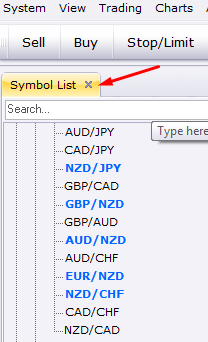
The new Symbol List feature will allow you to quickly find the instrument you need, either through scrolling down the list of tradable instruments, or by typing the instrument you need into the search bar: Once you find the instrument…
Learn More