
In order to see the ask chart on Trading Station please follow these steps: Open the chart and timeframe that you would like to see the ask prices for In the top tool bar locate the buttons that say "Bid"…
Learn More
In order to set up text message alerts in Trading Station, please follow the steps below: Click on “System” in the top Toolbar of the Trading Station window and press “Options” In the options window, please go down to the…
Learn More
To access the FXCM App Store, navigate to http://www.fxcmapps.com Logging In Click on the “Login” button in the navigation bar. There are two login forms that you can choose from: Blue or Grey Blue Form: Use this form if you have…
Learn More
To install a TSII indicator that was downloaded from the FXCM App Store please open the “.zip” file downloaded from the FXCM App Store. This should reveal a “.exe” file. Run the file to start the installer. Press “Next” to…
Learn More
Create Watchlist: Once you have selected the instruments you need, you can save your selection as a Watchlist by going to View -> Watchlists -> Save Watchlist. You can name this watchlist whatever you would like and type a description…
Learn More
Watchlists allow you to subscribe to the symbols you would like to follow. If you would like to have a watchlist just for the forex pairs you follow, for example, you can select and add those forex pairs through the…
Learn More
You can simply click the X on the Symbols List tab to remove it from your platform:
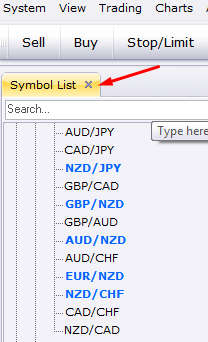
The new Symbol List feature will allow you to quickly find the instrument you need, either through scrolling down the list of tradable instruments, or by typing the instrument you need into the search bar: Once you find the instrument…
Learn More
In this new edition of Trading Station, FXCM has made three major updates to improve your trading experience: Symbols List – This feature allows you to either search for your instrument of choice or view different products under an organized…
Learn More
Trading Station Desktop was designed specifically for experienced chart traders. Trading Station Desktop includes all of the trading features and a similar design to our primary platform, Trading Station Web. But what sets it apart as a professional-grade trading platform…
Learn More
Official trading reports can be accessed through MyFXCM or by logging into Trading Station with your MetaTrader 4 account. Trading reports from these two sources will provide you with the most current and accurate trading activity.
Save your Expert Advisor file to the experts folder located at C:Program FilesFXCM MetaTrader 4experts. If installed correctly, you will see the Expert Advisor file in the "Navigator" window under Expert Advisors and is now available to activate for live trading.