Some technical issues that can occur with the platform will need to be corrected by performing a full uninstall and reinstall of the Trading Station platform. If you are experiencing technical issues with the platform, follow the steps below: Click…
Learn More
FXCM apps are only compatible with a Windows based operating system and cannot be downloaded onto a mobile device.
Your watchlist will be the symbols you are subscribed to in the simple and advanced dealing rates tab. You can always check which watchlist you have open by looking at the symbols that appear in these tabs.
You can open any watchlist you created by going to View -> Watchlists -> Open Watchlist. From there you can select the watchlist you would like.
Learn More
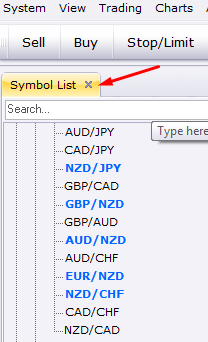
You can simply click the X on the Symbols List tab to remove it from your platform:
Once you have selected the instruments you need, you can save your selection as a Watchlist by going to View -> Watchlists -> Save Watchlist. You can name this watchlist whatever you would like and type a description if needed.…
Learn More
The new Symbol List feature will allow you to quickly find the instrument you need, either through scrolling down the list of tradable instruments, or by typing the instrument you need into the search bar: Once you find the instrument…
Learn More
To rename a Watchlist, go to View -> Watchlists -> Manage Watchlists. You can then select the Watchlist you would like to edit and click the 'Rename' button:
Learn More
You can move your Watchlist from computer to computer by simply moving the watchlist files, which you can access by going to View -> Watchlists -> Manage Watchlists -> Export Simply copy these files and use the file-sharing method of…
Learn More
You can remove a Watchlist by going to View -> Watchlists -> Manage Watchlists. Once the new window appears, you can click 'Remove' to Delete that particular Watchlist you have highlighted:
Learn More
To create a chart: Click on the yellow clock icon from the Trading Station navigation menu. You can also select "Charts" from the main menu bar and click on "Create Chart". A "Create Chart" window will appear. Select the symbol,…
Learn More
Watchlists allow you to subscribe to the symbols you would like to follow. If you would like to have a watchlist just for the CFDs you follow, for example, you can select and add those CFDs through the Symbols List…
Learn More