OTO (One-Triggers-the-Other) Contingent Order
Overview
The article describes the OTO (One-Triggers-the-Other) contingent order.
An OTO (One-Triggers-the-Other) Contingent Order is a contingent order consisting of two (or more) linked orders: one primary order and one (or more) secondary orders. When the OTO contingent order is placed, the primary order becomes active while the secondary orders remain inactive. Once the primary order is executed, the secondary orders are automatically triggered (activated). The primary and secondary orders can be placed from one and the same account but for different instruments. The primary order also can be a primary order for the ELS Contingent Order.
The secondary order can be a primary order of another OTO contingent order as well.
Ether an entry or a market order can be a primary order. Only an entry order can be a secondary order. The trade operation of the secondary orders does not depend on the trade operation of the primary order and can be the same or opposite. The amount also does not depend on the amount of the primary order.
The additional feature of the OTO contingent order is that the If-Then order may be used as a primary order. The If-Then order isn't an order generaly. it doesn't buy or sell an instrument. It is only an activation signal to secondary orders. The If-Then order works in the same manner as an entry order. Once the market price reaches the price specified in the order, it is "executed" and the secondary orders are activated on market.
** Primary Order Execution ** The time-in-force options and execution details for a primary order are the same as those an Entry Limit, Entry Stop and Open Market, Open, Open Limit, Open Range orders.
** Secondary Order Execution ** The time-in-force options execution details for a secondary order are the same as those for either an Limit/Entry Limit Order or Stop/Entry Stop Order.
** OTO Contingent Order Execution ** As it was said above, secondary orders become active only after the primary order is completely executed. If the primary order is completely or partially rejected the secondary orders are cancelled. When the secondary orders become active, they turn to regular entry orders. See execution Scenario 1, Scenario 2, Scenario 3, Scenario 4.
** OTO Contingent Order Expiration ** If the primary order expires (makes sense only for orders with DAY or GTD time-in-force option), all secondary orders expire as well.
** OTO Contingent Order Cancelation and Rejection **
If the primary order is cancelled by the trader, the secondary orders are automatically cancelled.
If a secondary order is cancelled by the trader, this doesn’t affect the other secondary orders.
If the primary order is rejected (for example, doesn’t pass validation), the secondary orders are automatically cancelled.
If the primary order is partially rejected (for example, doesn't completely filled because of IOC time-in-force option), the secondary orders are automatically cancelled.
If a secondary order is rejected due to unsuccessful validation, this doesn’t affect the primary order and the other secondary orders.
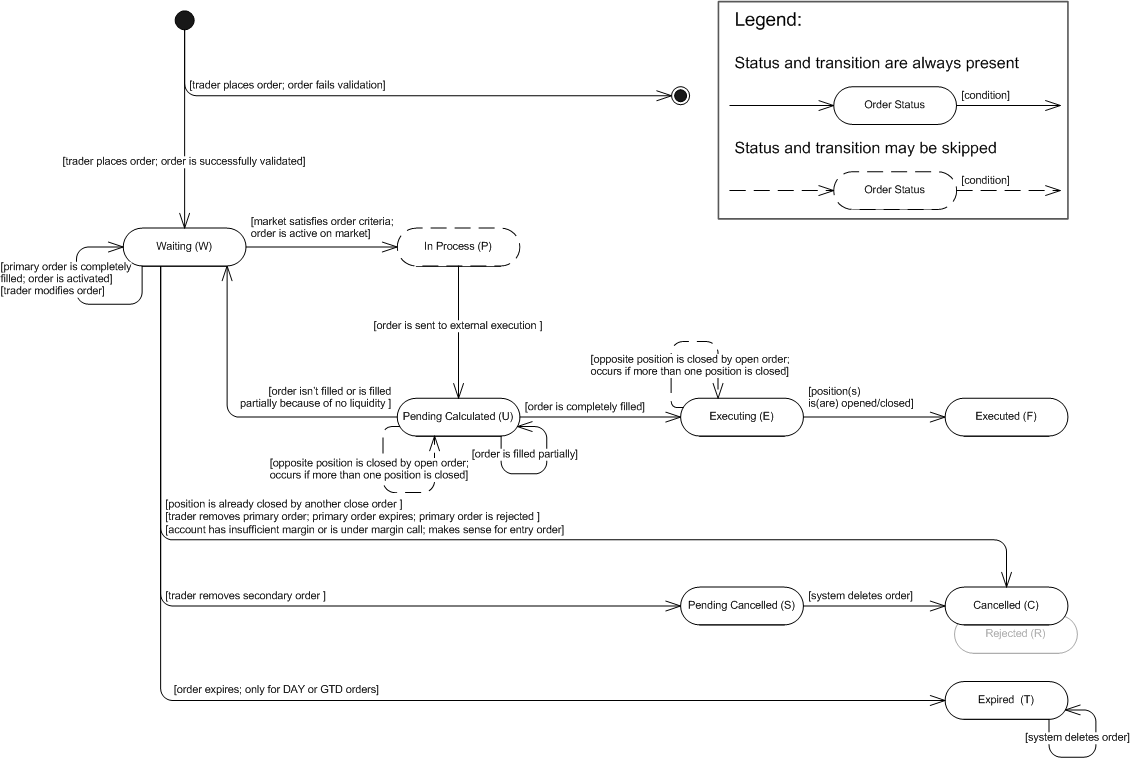
** OTO Secondary Order State Machine **
The OTO secondary order state machine is based on the FXCM order statuses. The description of order statuses, their transitions and state machine are provided below. Note that the order is created by the system only after successful order validation. If the order does not pass validation, the system creates a rejection message and does not store the order in the database. However, the information about the order (such as, for example, the order ID and the reason for its rejection) is stored in the database. So, the initial transition on the diagram indicates that the order is successfully validated.
OTO Secondary Order: State Machine
OTO Secondary Order: FXCM Order Statuses Description
| Order Status | Order Status Description | Transition |
|---|---|---|
| Waiting (W) | The status has one of the following meanings: - Initial Transition: The order was successfully validated and is waiting until the primary order is completely filled. - Transition from "Waiting (W)": 1) The order was modified by the trader. 2) The primary order was completely filled. The order was activated. - Transition from "Pending Calculated (U)": The order was filled partially or was not filled at all because of limited or no liquidity, and is waiting until the market price satisfies the order criteria. |
Waiting (W)The transition has one of the following meanings:- The primary order is completely filled. The secondary order is activated.- The trader modifies the order. In Process (P)The market price satisfies the order criteria. Pending Cancelled (S)The trader removes the order. Cancelled (C)The transition has one of the following meanings:- The position the order is placed on is already closed by another order.- Trader removes primary order, primary order expires or primary order is rejected.- The market price satisfies the order criteria, but there is insufficient margin in the account/the account is under the margin call. Expired (T)The transition is applicable only to DAY or GTD orders: |
| In Process (P) | The market price satisfied the criteria set in the secondary order; the order is ready for further execution. | Pending Calculated (U)The secondary order is sent to external execution. |
| Pending Calculated (U) | The status has one of the following meanings: - Transition from "In Process (P)": The market price satisfied the secondary order criteria and the order was sent to external execution. - Transition from "Pending Calculated (U)": The secondary order was filled partially. |
Executing (E)The secondary order is completely filled. Pending Calculated (U)The order is filled partially. Position is opened/closed in the filled amount. Note that the filled portion may result ina number of open/closed positions.Note:Only active secondary orders make this transition. Waiting (W)The secondary order cannot be filled because there is no liquidity to fill the order. |
| Executing (E) | The secondary order was completely filled. | Executed (F)A position is either opened or closed. Note that the order may result in a number of open/closed positions. |
| Executed (F) | A position was opened/closed. Note that the order may result in a number of open/closed positions. | |
| Pending Cancelled (S) | The order was removed by the trader. | Cancelled (C)The trader removes the order and the system deletes order. |
| Cancelled (C) | The status has one of the following meanings: - Transition from "Waiting (W)": 1) The position the order was placed on was already closed by another order. 2) Trader removed primary order or primary order was rejected. 3) The account is under the margin call/there is insufficient margin in the account. - Transition from "Pending Cancelled (S)": The order was removed by the trader and deleted by the system. |
|
| Expired (T) | The status is applicable only to DAY or GTD orders: The order expires because it cannot be executed on the day it was placed or before specified date. |
Expired (T)The transition is applicable only to DAY or GTD orders: |